Malfunctions
Having a problem with RaidProtect? The solution is probably here.
Sometimes, things don't work as expected. Here are the most common issues you may encounter, and how to resolve them.
If this page does not provide an answer to a problem you are experiencing, feel free to contact our support team who will be happy to help you!
The bot displays an error when I run a command
If the command does not execute successfully, RaidProtect may display an error instead of the expected result. In most cases, an indication is given in the message, but it may be a more generic message. Here is how to resolve this issue in most cases.
-
Do what is indicated. Some errors clearly explain the problem. If the bot asks you to do something, do it.
-
Check the command parameters. The command may simply be written incorrectly; check the help to see how to use it. Don't forget that brackets ([]) should not be included.
-
Check the bot's permissions. It must have the Administrator permission and be at the administrator level in the role hierarchy.
-
Retry the command. Sometimes, the problem resolves itself for no apparent reason.
If you continue to get an error despite following these tips, contact our support so we can help you.
The bot's log channel was not created automatically
To notify you of the actions it takes, RaidProtect needs a log channel. This channel is created automatically when the bot joins for the first time, but sometimes no channel is created. Here is how to fix this issue.
-
Make sure the bot has Administrator permissions. For the bot to work properly, you need to give it the Administrator permission. If this is not done, go to the role settings and grant this permission to the RaidProtect role. Then you just need to manually initialize the bot for everything to work (see below)!
-
Check that the bot is properly initialized. This is normally done automatically, but you can force this initialization with the
/setupcommand. The log channel should be created automatically. -
Manually set a channel. If nothing works, don't panic, you can manually choose the channel the bot will use for logs! Once a dedicated channel is created, run the
/settingscommand then select Logs.
A user spammed, but the bot did not sanction them
The anti-spam is one of RaidProtect's main features, and it can be frustrating if it doesn't work. But rest assured, most of the time, it's nothing serious.
-
If the anti-spam asks to stop spamming, but does not sanction, this is likely due to a lack of permissions. Remember, the bot must have the Administrator permission and must be at the administrator level in the role hierarchy.
-
Check the anti-spam configuration. It sounds silly, but some people forget that they have ignored a channel.
-
Check the spammer's permissions. Administrators are ignored, so if you are testing the anti-spam on your own server, it may not detect you.
-
Is the spam long enough? The bot generally only detects spam starting from more than 5 messages. Don't be too hasty.
If despite all this, spam is still not detected, contact us on our support server with a screenshot of the problem.
Users have access to the server without passing the captcha
This problem is relatively common, but depends on your server's configuration. Let's see how to fix it.
-
Do you have an automatic role? If you have configured a bot (other than RaidProtect) to assign a role to new arrivals on your server, this can interfere with the captcha. Replace it with RaidProtect's autorole.
-
Have you enabled the captcha? This is an entirely optional feature that requires running a command to enable it. Check the documentation page dedicated to the captcha for more information.
Users can still talk when I lock a channel
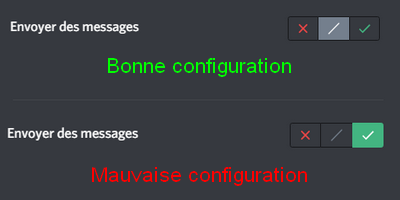
The lock command seems magical, but it also has its weaknesses. As noted in this documentation, the command only acts on the @everyone role. This means that if a role in the channel you want to lock explicitly has permission to speak, it will still be able to do so. As a picture is worth a thousand words, here is what it looks like in practice.